




Abu Dhabi Salik helps keep the city’s roads flowing smoothly through the DARB system, which places toll gates at major entry points. Fees during peak hours encourage drivers to use alternative routes or public transport, reducing congestion and improving traffic conditions.
Knowing how to register Salik in Abu Dhabi is essential for residents and visitors. This guide explains the registration process, how to activate Abu Dhabi Salik, and tips to avoid fines, making the toll network easy to navigate.
What is Salik in Abu Dhabi?
Salik in Abu Dhabi, also known as the DARB Abu Dhabi toll system, is a road toll collection system managed by the Department of Municipalities and Transport (DMT) to reduce traffic congestion.
The word “Salik” means “clear” in Arabic, symbolizing the goal of keeping roads clear and smooth. Toll gates are strategically placed at entry points to manage traffic during peak hours by charging drivers a fee.
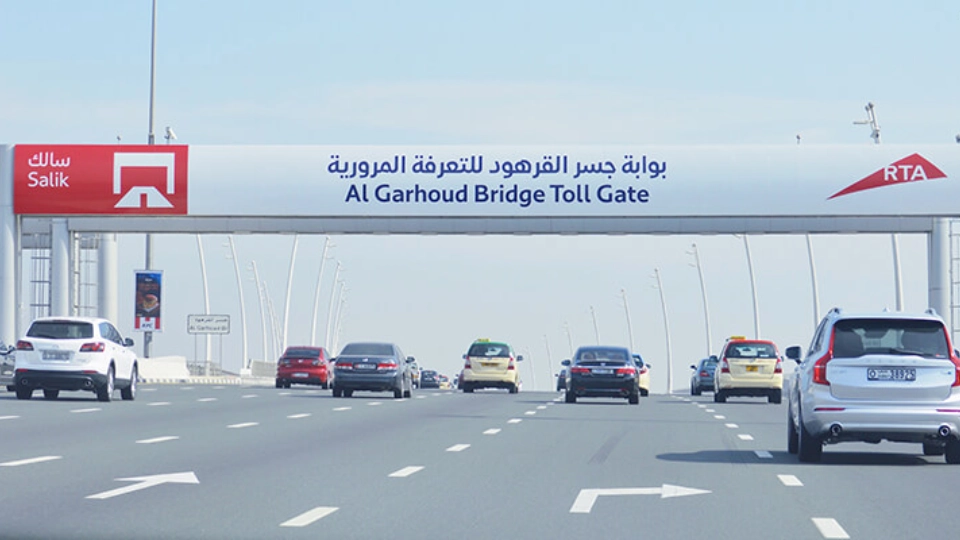
DARB helps reduce the environmental impact by minimizing vehicle emissions and traffic jams. Similar to Dubai’s Salik, the Abu Dhabi system operates under the DARB name, supporting the city’s growth while reducing congestion. All vehicles using toll roads must be registered with DARB, and tolls are automatically deducted from the driver’s account when passing through a toll gate. Registration and account management can easily be done online or through the DARB app, making it essential for all residents and visitors to comply with the system.
How To Register for Abu Dhabi Salik Online?
Registering for Salik Abu Dhabi online is a simple process that can be completed in a few steps.
- Visit the official DARB website or download the DARB app.
- Create an account by entering your personal details, including your Emirates ID and vehicle information.
- Complete the registration and activate your account by adding a balance.
- Your balance will be automatically deducted each time you pass through a toll gate.
Registration ensures that your vehicle is linked to the DARB Abu Dhabi system, allowing for smooth toll payments and helping you avoid fines for unpaid tolls.
Documents Required for DARB Salik Registration
To register your vehicle for DARB Salik, you will need the following documents:
| 1 | Emirates ID |
| 2 | Vehicle registration card (Mulkiya) |
| 3 | Contact details (email and phone number) |
These documents help verify your identity and ensure that your vehicle is fully registered for toll payments in Abu Dhabi.
Abu Dhabi Salik Registration For Company Vehicles
Company vehicles must also be registered for the DARB system. The process is similar to personal vehicle registration, but companies must provide additional documentation. This includes
- The company’s trade license
- Proof of vehicle ownership
- Emirates IDs of authorized drivers
Companies can register multiple vehicles under a single account, making it easier to manage toll payments for their entire fleet.
Steps For Abu Dhabi Salik Account Activation
Activating your salik Abu Dhabi (DARB) account is essential for using the toll roads without facing penalties. Here are the steps you need to follow to activate your Salik account:
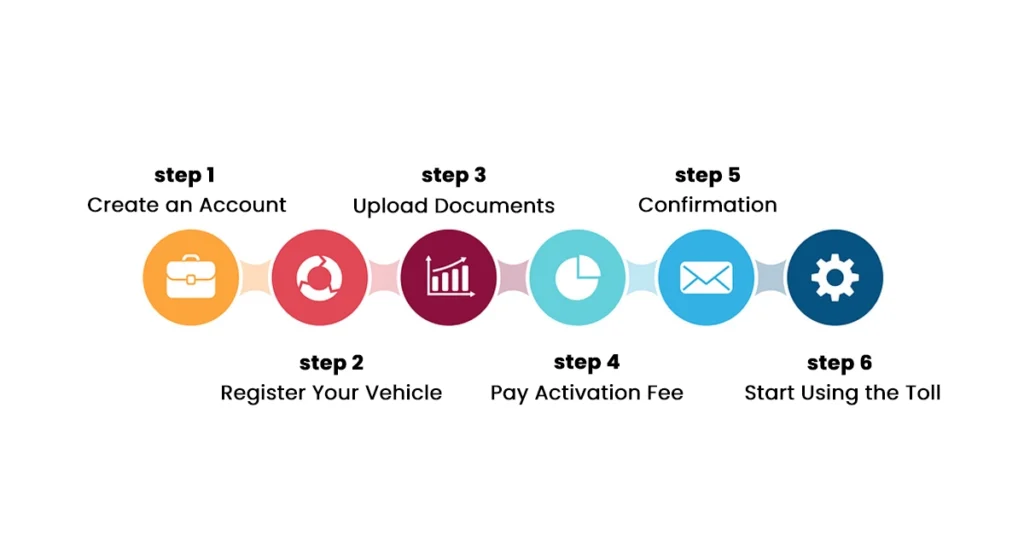
- Create an Account: Visit the DARB website or download the app to create an account. You’ll need to provide your email, mobile number, and personal details to get started.
- Register Your Vehicle: Enter your vehicle’s registration number and plate details. If you have more than one vehicle, register each one separately.
- Upload Documents: Provide necessary documents like your vehicle registration card. For company vehicles, additional documents may be required.
- Pay Activation Fee: Complete the payment process, which includes an initial balance for your account. Payments can be made online through various methods.
- Confirmation: Once your payment is processed, you’ll receive an email or SMS confirming that your DARB Abu Dhabi account is activated.
- Start Using the Toll: With your account active, toll charges will be automatically deducted each time you pass through a toll gate. Manage your account easily through the portal or app.
By following these steps, you ensure that your vehicle is properly registered and your account is ready to go, allowing you to use the toll roads in Abu Dhabi without interruptions or fines.
Abu Dhabi Salik Balance Check
To check your Salik balance in Abu Dhabi, log into your DARB account via the website or mobile app. Once logged in, you can easily view your current balance, recent transactions, and remaining funds. It’s important to monitor your balance regularly to avoid running out of credit, which could result in penalties when passing through toll gates.
Additionally, you can set up notifications for an automated Abu Dhabi Salik balance check system which alerts you when the balance is low, ensuring you never get caught off guard.
Abu Dhabi Salik Recharge
Recharging your Salik account in Abu Dhabi is straightforward and can be done through various methods. You can top up your account using the DARB app, website, self-service kiosks, or through certain banks. Simply choose the most convenient method for you and add the desired amount to your account.
Maintaining a sufficient balance ensures that you can pass through toll gates without any disruptions or fines. Here is a complete list of Abu Dhabi Salik recharge methods.
| Salik Self-Service Machines | Located at various points such as Mawaqif Abu Dhabi Main Bus Terminal, Lulu Hypermarket Baniyas, Safeer–Musaffah, and more |
| Salik Call Centre | Call 800 SALIK (72545) for assistance with recharging your Salik account |
| Salik Website | Visit the official Salik website to recharge your account online |
| Salik Mobile Application | Use the Salik app to recharge your account via your smartphone |
| Dubai Drive App | Log in to the Dubai Drive app and select Salik to recharge your account |
| Dubai Now App | Log in to the Dubai Now app, select Salik, and recharge your account |
| Careem App | Log in to the Careem app, choose Bills & recharges, then select Salik to recharge your account |
| TAMM Self Service | Use TAMM for self-service recharging of your Salik account |
Abu Dhabi Toll Gate Costs
The cost of passing through DARB Abu Dhabi toll gates varies depending on the time of day. Typically, the fee is AED 4 during peak hours and is deducted automatically from your Salik account. The peak hours generally apply in the morning from 7:00 AM to 9:00 AM and in the evening from 5:00 PM to 7:00 PM. Outside of these hours, there is no toll charge for passing through the gates.
| Time of Day | Toll Fee |
| Peak Hours (7:00 AM – 9:00 AM, 5:00 PM – 7:00 PM) | AED 4 |
| Off-Peak Hours | Free |
Abu Dhabi Toll Gate Fines
Abu Dhabi salik fine are penalties imposed when drivers fail to comply with the DARB toll system requirements. Here’s a breakdown of the key situations where fines may apply:
1. Unregistered Vehicle: Passing through a DARB toll gate without registering your vehicle results in fines: AED 100 on day 1, AED 200 on day 2, and AED 400 for subsequent days, up to AED 10,000.
2. Insufficient Account Balance: Ensure your Salik account has enough balance. A five-day grace period applies, after which AED 50 is charged per unpaid toll.
3. Failure to Pay Toll Fees: Not settling toll fees on time leads to fines. Regularly check your balance to avoid penalties.
4. Toll Gate Violation: Tampering with the Salik tag or covering your number plate is prohibited and may result in heavy fines.
5. Late Payment: Delaying fine payments can increase the amount and incur extra administrative fees.
By ensuring that your vehicle is registered, your account is properly maintained, and your balance is topped up, you can easily avoid these fines and have a smooth driving experience in Abu Dhabi.
Who Is Exempt From Paying Toll Fees?
The Abu Dhabi Tolling System (DARB) offers full or partial exemptions to specific groups to promote accessibility and social welfare. Exemptions fall into two categories:
Automatic Exemptions (No Application Needed):
- Emergency vehicles (ambulances, civil defense, police)
- Public transport buses
- Motorcycles
- School transport buses
By-Request Exemptions (One Vehicle Per Person):
- People of Determination: Submit a valid Ministry of Community Development card or Sanad card.
- Senior Emiratis (60+) & retirees: Provide Emirates ID and pension proof.
- Low-income households: Submit income certificates issued by Abu Dhabi social services.
Required documents: Emirates ID, vehicle registration, proof of eligibility. Apply via the DARB portal or email. Exemptions require annual renewal.
Abu Dhabi Salik Timing
Abu Dhabi salik time is mainly during peak traffic hours, which are from 7:00 AM to 9:00 AM and 5:00 PM to 7:00 PM. During these times, drivers passing through the toll gates will be charged AED 4 per trip. Outside of these hours, the toll gates are inactive, and no charges are applied.
Understanding these timings helps you plan your trips better, allowing you to avoid unnecessary toll fees.
Abu Dhabi Toll Gate Locations
The DARB Abu Dhabi toll gates are strategically placed at key entry and exit points in Abu Dhabi to regulate traffic flow and reduce traffic. Here is a table listing the Abu Dhabi road toll gates:
| Abu Dhabi Road Toll Gates | Description |
| Sheikh Zayed Bridge | The main entry point to Abu Dhabi city |
| Al Maqtaa Bridge | Connects the mainland to Abu Dhabi Island |
| Mussafah Bridge | The key link between Abu Dhabi and industrial areas |
| Sheikh Khalifa Bridge | Provides access to Saadiyat and Yas Island |
Common Salik Issues & How to Avoid Them
Navigating the Abu Dhabi Salik system smoothly requires awareness of these pitfalls:
Table: Avoiding Common DARB Penalties
| Issue | Grace Period | Penalty | Prevention Tip |
|---|---|---|---|
| Unregistered vehicle passing toll | 10 working days | AED 100 (Day 1), AED 200 (Day 2), AED 400/day thereafter (max AED 10,000) | Register before using toll roads 13 |
| Low balance (out-of-emirate plates) | AED 50 per crossing after a grace period | An unregistered vehicle passing toll | Set balance alerts via DARB app 313 |
| Plate tampering or damaging toll equipment | None | AED 10,000 fine | Never obscure plates; use official lanes 13 |
Key Insight: Out-of-emirate vehicles (e.g., Dubai-registered cars) face stricter balance rules. Top up immediately after crossing gates to avoid penalties.
Tips for Smart Tolling in Abu Dhabi
Maximize savings and compliance in the Abu Dhabi Tolling System with these strategies:
- Master Timings: Travel outside Abu Dhabi Salik Timings (peak hours: 7–9 AM, 5–7 PM) to avoid AED 4 charges 38. Sundays/public holidays are always toll-free.
- Register All Vehicles: Company cars, rentals, or personal vehicles must be linked to your DARB account. Use the official portal to avoid third-party scams.
- Auto-Top-Up: Enable auto-recharge in the DARB app when balances fall below AED 20. Link credit cards for seamless payments.
- Verify Balances Officially: Use only the DARB app, website (darb.itc.gov.ae), or toll-free number (800-850) for balance checks.
- Combine with Insurance: Buy car insurance in Abu Dhabi that covers toll fines (e.g., comprehensive policies). This dual protection minimizes financial risks from oversights.
Conclusion
Abu Dhabi Salik helps manage traffic and reduce congestion through toll gates at key entry points. Staying compliant by registering, recharging, and monitoring your account keeps you fine-free. Pairing Salik with reliable car insurance in Abu Dhabi adds extra protection and ensures stress-free driving around the city.
Frequently Answered Questions
1: How to apply for Abu Dhabi Salik exemptions?
To apply for Abu Dhabi Salik exemptions, you need to visit the DARB website or app. Exemptions are typically granted to specific categories, such as individuals with special needs, senior citizens, or low-income residents. You will need to submit documents proving your eligibility for the exemption.
2: Who are exempted from Abu Dhabi toll gate charges?
Exemptions from Abu Dhabi toll gate charges are given to certain groups, including people with disabilities, senior citizens, and some government vehicles. Eligible individuals must apply for the exemption online, and approval will depend on meeting specific criteria.
3: How many DARB Gates are there in Abu Dhabi?
Currently, there are four main DARB toll gates in Abu Dhabi, located at the city’s key entry and exit points. These gates help control the flow of traffic and reduce congestion during peak hours.
4: Can I enter Abu Dhabi without DARB?
You can enter Abu Dhabi without being registered in the DARB system, but if you pass through a toll gate during the designated peak hours, you have 10 working days to complete your registration. Failing to do so will result in a violation under the executive regulations for Abu Dhabi’s toll system.
5: How much is DARB fees in Abu Dhabi?
The DARB toll fee in Abu Dhabi is AED 4 during peak hours, which are from 7:00 AM to 9:00 AM and from 5:00 PM to 7:00 PM. Outside of these hours, there is no fee for passing through the toll gates.
6: What is the difference between DARB and Salik?
DARB is the toll gate system used specifically in Abu Dhabi, while Salik is the name of the toll system used in Dubai. Both systems work similarly, deducting fees from a prepaid account when drivers pass through toll gates, but they operate in different Emirates.



Comments (0)
Leave a comment